AI agentic development team

From idea
to working software.

An AI agent in every role: one plans, one reads the code, one writes it, one tests, one reviews. They work as a team and bring the work as a pull request. The merge is your call.

  • Every job arrives on its own branch as a pull request
  • The merge is your call
  • Open pricing, excluding VAT
Autonomous loop

Hand over the work. The team runs its own loop.

A job passes through the agent team, becomes a PR, produces test scenarios and is tried in an autonomous test. If a finding turns up, the team takes it back as a new job. You decide at only two points.

  1. Work arrivesFrom the board, Jira, Sentry or a single sentence.
  2. PlanThe planner clarifies the work and drafts the plan.Your decision
  3. Code readingThe analyst reads your code, docs and rules.
  4. CodingThe developer writes code that follows your rules.
  5. Test and reviewThe tester collects evidence, the reviewer checks.
  6. Pull requestA PR opens; the merge is your call.Your decision
  7. Scenario generationTest scenarios are written for the changed screens.
  8. Autonomous testAfter the merge, the test agent explores the app.
  9. Finding → new jobIf a finding turns up, a fix job opens; the loop starts again.

Automatic jobs from findings run when the autonomous loop is on for the project; attempts per finding and jobs per day are capped.

The difference

A single AI subscription, or a team that finishes the job?

A single AI coding subscription writes good code. But shipping a product end to end is only half code: setting up environments, testing, keeping things secure and keeping work going is left to you. Below you see side by side what you would have to do yourself and where you carry the risk.

TopicSingle AI subscriptionFacimus
Management

You drive every step: write the request, check the plan, read the output, say what comes next. You have to stay with the session.

You hand over the card; planner, developer, tester and reviewer roles pass the work on with evidence. Only the plan approval and the pull request come to you.

Context

You write and maintain rule files; what a teammate taught their assistant, yours does not know.

Repositories are scanned; work starts from a knowledge pool and approved rules, and plan rejections and PR comments become lessons for the team.

Testing

You verify whether "tests pass" is true; the assistant may skip a test it broke or edit the test to make it pass.

The platform runs the tests itself, independently of the agent; a test the change breaks stops the job and opens a fix round.

Test environment

Renting a server, setting up the database and cache, wiring frontend to backend, domain and SSL, and remembering to shut it down are on you.

Backend, frontend, database and cache come up per job on their own, with a yourname.preview.facimusai.dev address; it shuts down when the job ends and you pay only while it is up.

End-to-end tests

You write browser tests, bring the environment up and run them yourself.

Once the environment is ready its screens are browsed and checked automatically; findings land on the job.

Mobile

Android SDK, build settings, APK signing, emulator setup and test devices are on you.

For a mobile repository the APK is built, runs in an Android emulator you open in the browser, and its screens are tested automatically.

Security

The assistant usually runs on your machine with your permissions: it can reach your files, keys and open sessions. You carry the impact of a wrong command.

Every job runs in an isolated, temporary environment; secrets are never logged and the environment is separate from your systems. Code arrives on a branch as a pull request; merging is your call.

Continuity

When a usage limit is hit the work stops halfway; waiting or switching accounts is up to you. Individual subscription terms may not suit commercial team use.

During an outage the job waits in the queue and continues where it stopped. It is a service built for commercial use.

Cost

You work out what you spent and what a feature cost.

Every job's credit breakdown is shown line by line; warnings when credits run low and run out, and a per-job safety cap.

After the job

You relay PR comments to the assistant one by one and remember to retest after the merge.

It answers PR comments with a revision; after the merge the app is retested.

The comparison is at capability level. A numeric benchmark running the same jobs with a single subscription and with Facimus will be added here when published.

How it works

One task,
delivered in five steps.

The cards below are samples; real work runs in your own repository.

  1. 01 · PlansPlanning agent

    Clarifies the work

    Takes your request or a suggestion from the report, clears up the ambiguity and splits the work into small steps.

    Add coupon codes to the cartsample
    • Coupon validation service
    • Discount on the cart total
    • Invalid coupon warning
    Plan ready
  2. 02 · LearnsCode reader agent

    Reads your repository

    Maps the structure, your rules and the domain knowledge, and finds where the change will land.

    Repository analysissample
    • Business: B2B ordering portal
    • Stack: Node.js · PostgreSQL · React
    • Touches: cart and coupon modules
    Reading done
  3. 03 · BuildsDeveloper agent

    Writes the code

    Follows your architecture and your rules. Every task gets its own branch.

    feature/coupon-codesample
    • + const discount = await coupons.apply(cart, code);
    • + if (!discount.valid) return invalidCoupon(code);
    • − total = cart.subtotal;
    6 files changed
  4. 04 · TestsTest agent

    Comes with its tests

    Writes and runs the unit tests for the change; the work does not move on while a test is red.

    Unit testssample
    • coupons.apply · passed
    • Invalid coupon · passed
    • Cart total · passed
    All green
  5. 05 · DeliversReview and git agents

    A pull request arrives

    The change is reviewed, its docs are updated, it is committed and pushed, and a pull request opens. Leave a comment and the revision agent fixes it.

    Coupon code supportsample
    • Plan · change · test report
    • Revised from your comments
    • The merge is yours
    Awaiting your approval
Sample job

Watch one job
end to end.

Without signing up, see how the agent team carries a job on a sample project: plan, your approval, code, tests, review and pull request.

Facimus · Job · Add coupon codes to the cartWriting the planWaiting for your approvalCodingTestingReviewingWaiting for your merge
  1. Plan
  2. Approval
  3. Code
  4. Test
  5. Review
  6. Pull request
  1. PlannerPicked up the job: add coupon codes to the cart.
  2. Code readerRead the cart and coupon modules; the change will touch six files.
  3. PlannerWrote the plan: three steps, each tied to an acceptance criterion.
  4. PanelThe plan is waiting for your approval. On this job, no code is written before you approve it.
  5. YouYou approved the plan.
  6. DeveloperOpened the feature/coupon-code branch.
  7. DeveloperChanged six files; the main branch was not touched.
  8. Test writerWrote four unit tests for the change.
  9. Test writerRan the tests: all four passed.
  10. ReviewerReviewed the change against your rules and updated the README.
  11. GitCommitted and pushed; the pull request is open.
  12. PanelThe merge is your call.
Plan
  1. Coupon validation service
  2. Discount on the cart total
  3. Invalid coupon warning
Approve plan✓ Approved
Code
  • + const discount = await coupons.apply(cart, code);
  • + if (!discount.valid) return invalidCoupon(code);
  • + total = cart.subtotal - discount.amount;
  • − total = cart.subtotal;
Test
  • coupons.apply · passed
  • Expired coupon · passed
  • Invalid coupon · passed
  • Cart total · passed
Review
  • Follows your rules
  • Coupon code input is validated
  • README updated
Coupon code support
  • feature/coupon-code → main
  • 6 files · 4 tests
  • Plan, change and test report attached
Merge

This is an illustrative, sped-up example; real jobs run on your repository and take longer depending on its size.

Inside the product

One team board.
One agent team.

One panel to hand work to agents, watch them live and measure the result. The screens below are the product itself.

The path of one job: a Sentry error and a new job land on the board, the plan is approved, the agent team moves stage by stage, the job arrives as a pull request and is merged. Screen recording from the real panel; the sample job shown is scripted and sped up, it does not touch a real repository and runs no AI. The Value dashboard uses sample data. Download the video (WebM)
Text of the captions in the video
  1. An error from Sentry and a new job land on the board as cards
  2. The agent team wrote a plan. No code is written before you approve (default setting).
  3. Plan approved; the team gets to work
  4. On the live screen the job moves from specialist to specialist
  5. The developer agent writes the code
  6. The test agent runs the tests
  7. The reviewing agent checks it against your rules
  8. The change is pushed and a pull request opens
  9. The scenario agent prepares a test scenario
  10. The job arrives as a pull request. Merging is your call.
  11. Merged
  12. Value dashboard: delivered work, cost and hours saved

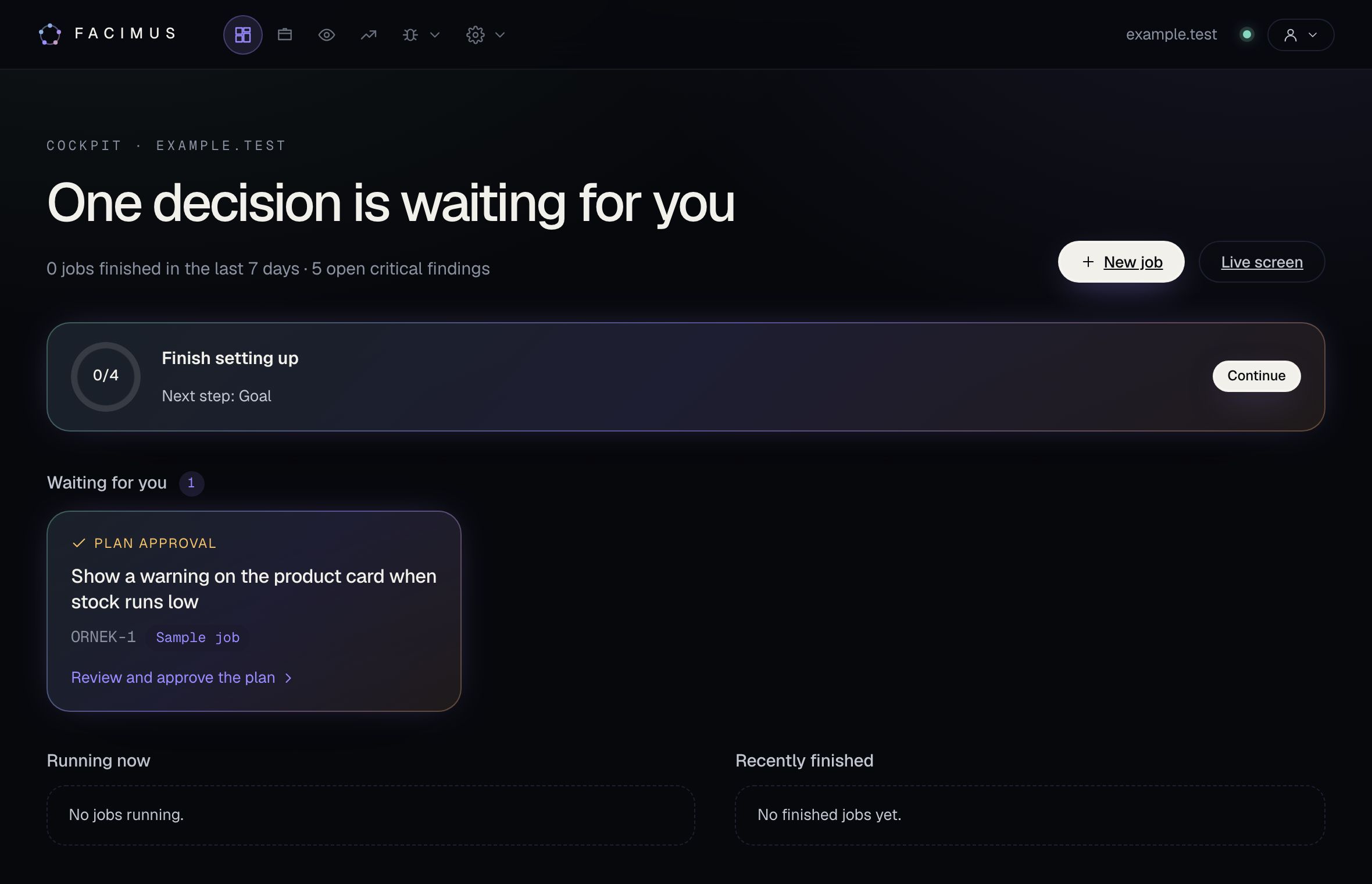
See what is waiting for you first

The cockpit starts the day with decisions: plans waiting for approval, stuck jobs and open critical findings at a glance.

  • Open a waiting plan in one click
  • Jobs running now and recently finished
  • Remaining setup steps and the next one
Facimus cockpit: a plan waiting for approval and the job summary

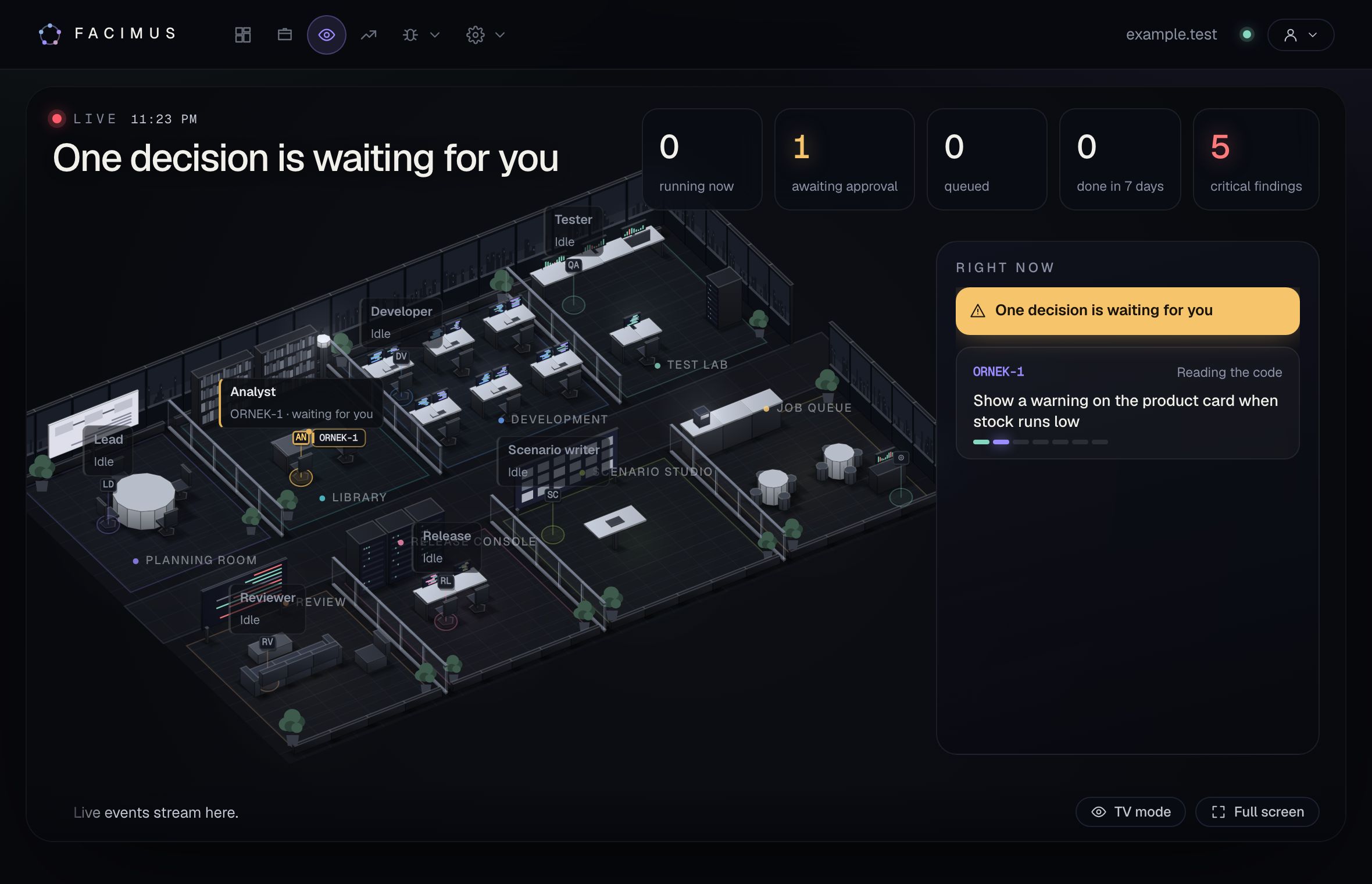
Watch your agent team in the office

Every role has its own desk. As a job moves from planning to code, testing and review, its card flies from specialist to specialist; built for big screens and TV mode.

  • Who is doing what, who is waiting for you
  • Jobs waiting for approval stand out
  • Office view and full-screen TV mode
Facimus live screen: agent roles and job flow in a 3D office

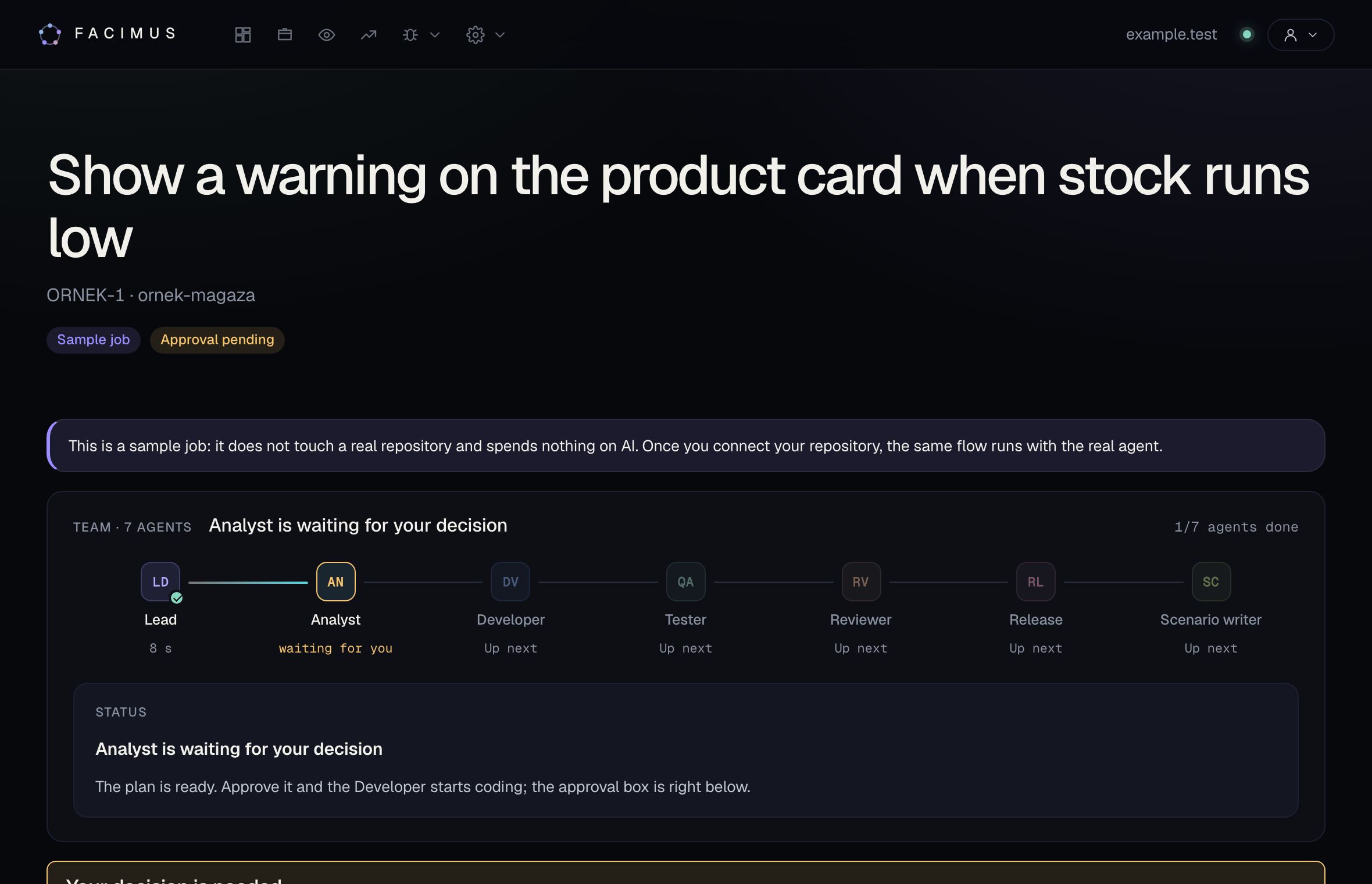
Every job goes through the same safe pipeline

Planning, reading the code, coding, testing, review, git and scenario. Each stage's output and evidence stays on the job page; the plan never turns into code without your approval.

  • Stage-by-stage progress and duration
  • Plan approval in the panel or in Slack
  • Steer the agent with a team note
Facimus job page: a seven-agent pipeline with a plan waiting for approval

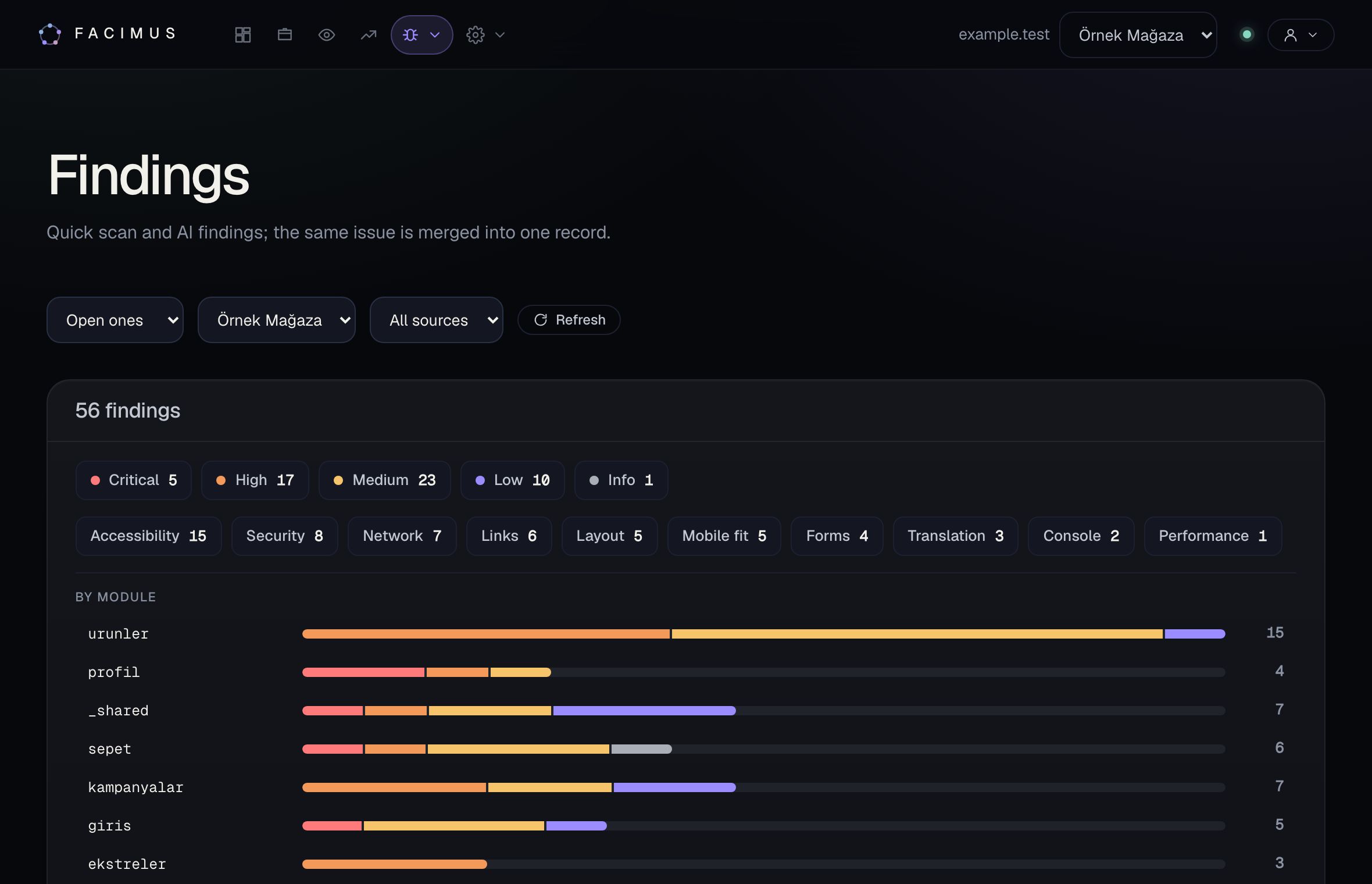
Let an agent explore your app and find bugs

Quick scans and AI-driven smart testing explore your app in a browser and group accessibility, security, form, mobile and console problems by module. One click turns a finding into a fix job.

  • The same bug is grouped into one record
  • Breakdown by severity and module
  • From finding to fix job
Facimus findings: findings by severity and module

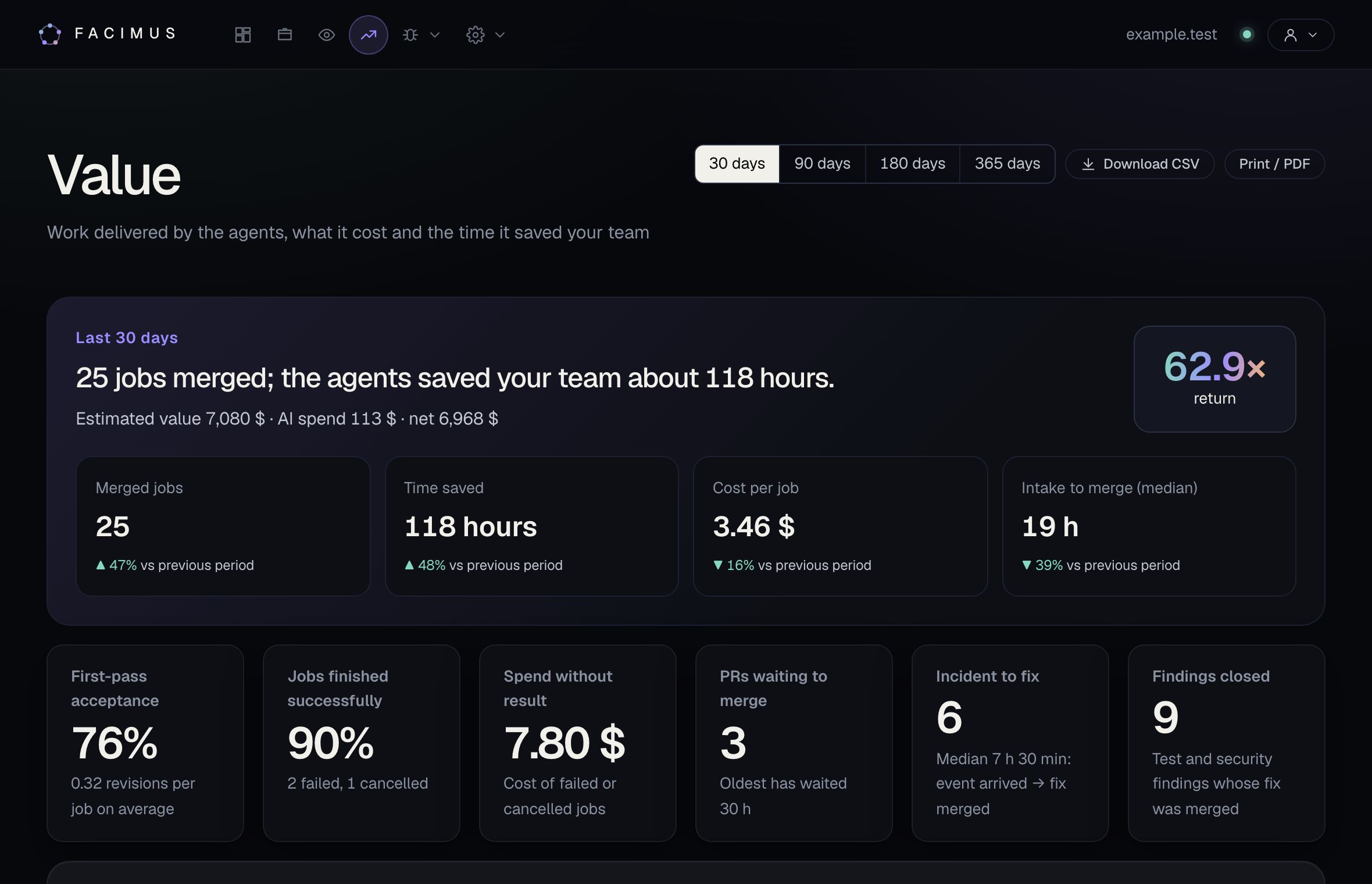
See what you gain, in numbers

Merged jobs, cost per job, intake-to-merge time and its bottleneck, first-pass acceptance and engineering hours saved, compared with the previous period.

  • Return against all AI spend
  • Where the time goes: bottleneck and advice
  • CSV and a printable executive report
Facimus Value dashboard: merged jobs, hours saved and return
Sample data

Screens are shown with sample data.

Platform

Fit the agent
to your team.

Not a generic AI: a team that learns your code, your rules and the way you work.

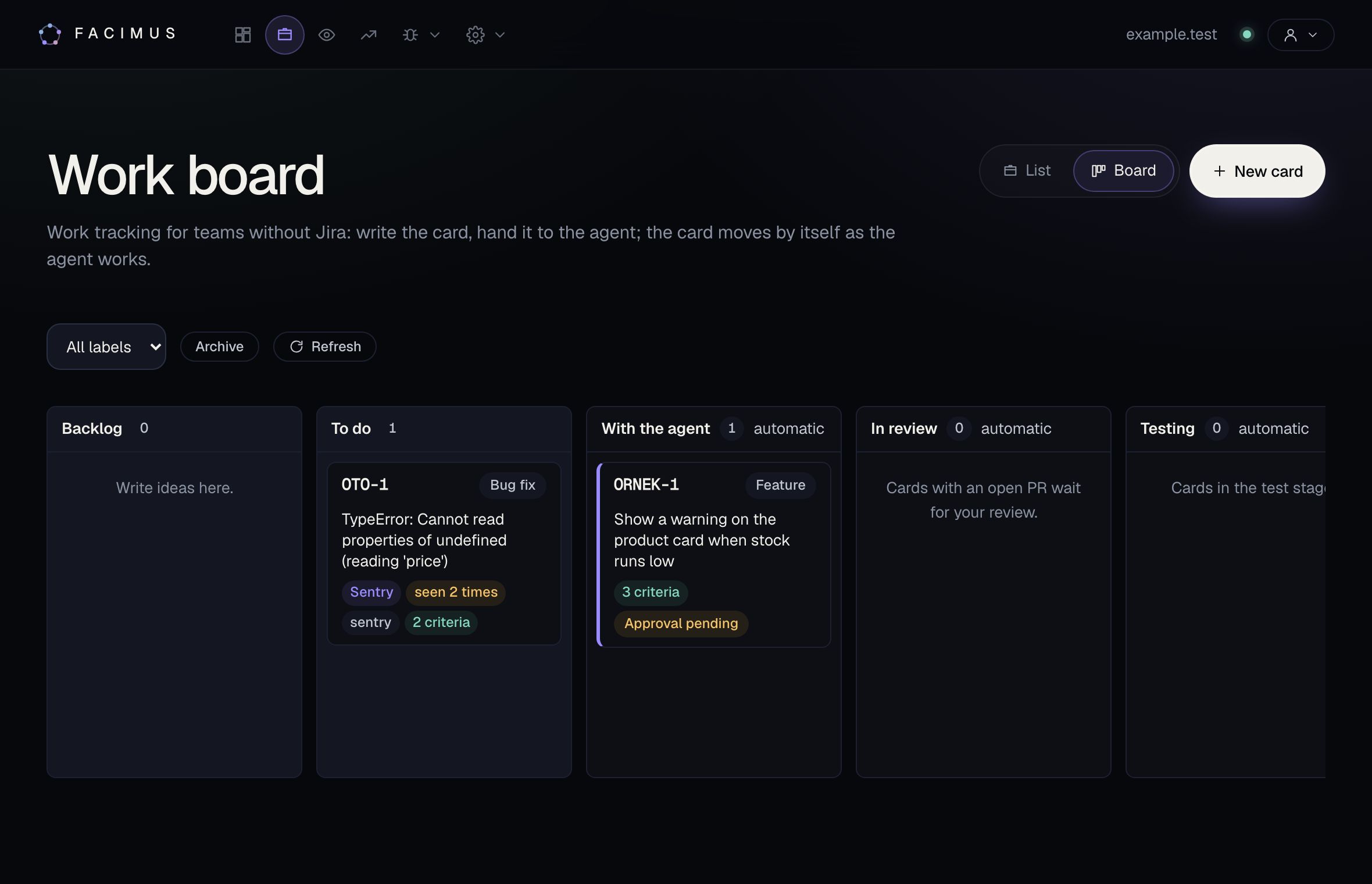
  1. Incoming events

    An error arrives, a card opens

    Events from Sentry, GitHub, GitLab, Linear or your own webhook land on the board as cards. Repeats are counted, and a closed error that comes back is caught as a regression.

    • Signed endpoint with replay protection
    • External jobs cannot run commands before approval
    • Labelled events can start the job automatically
    Facimus job board: an error card from Sentry and a job waiting for approval
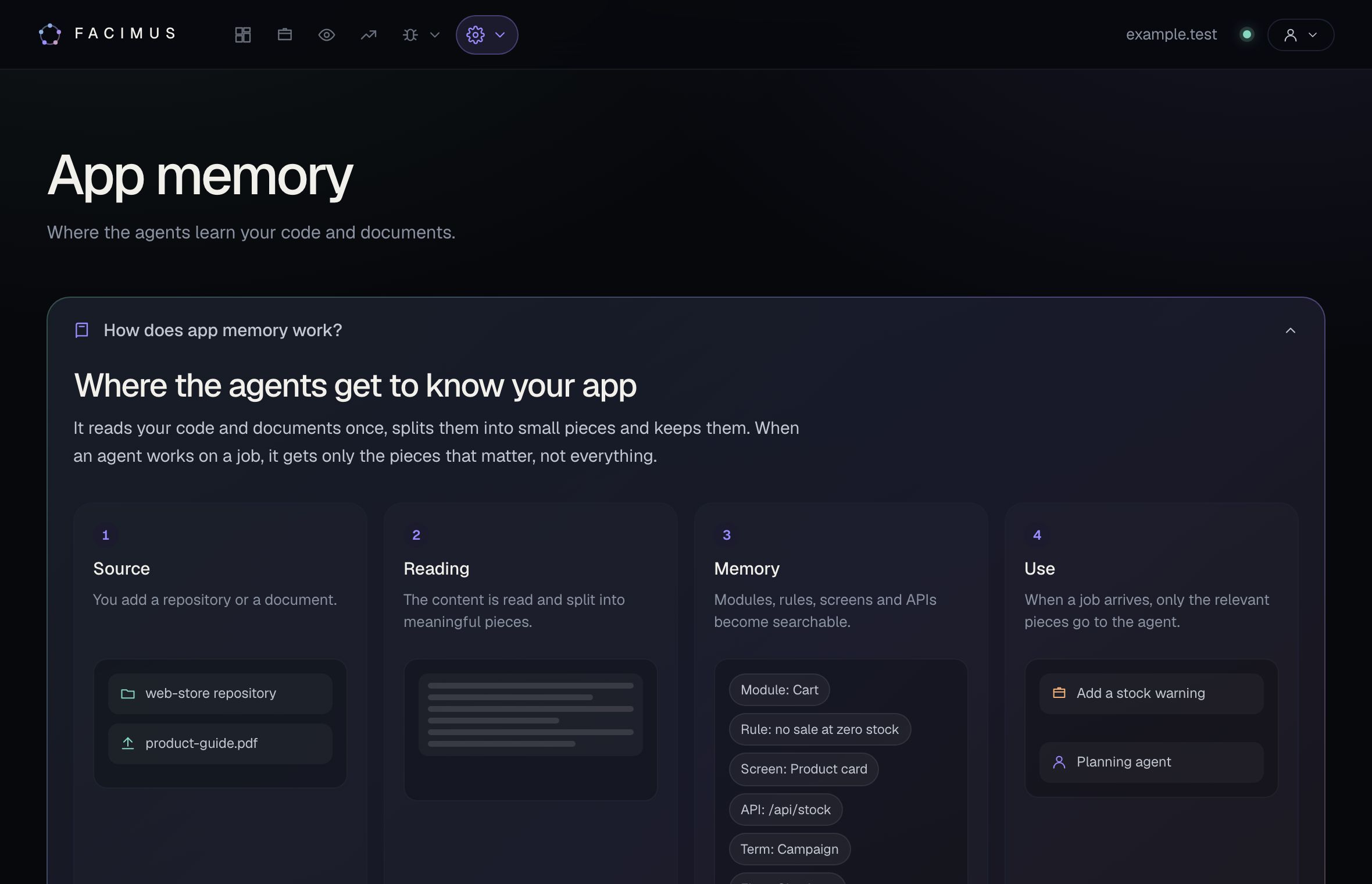
  2. App memory

    The agent reads what matters, not the whole repo

    Your code and documents are read once and split into meaningful pieces. When a job arrives the agent gets only the modules, rules, screens and APIs that matter for it.

    • Repository and document sources
    • Approved rule packs
    • Searchable map of modules, screens and APIs
    Facimus app memory: source, reading, memory and use steps
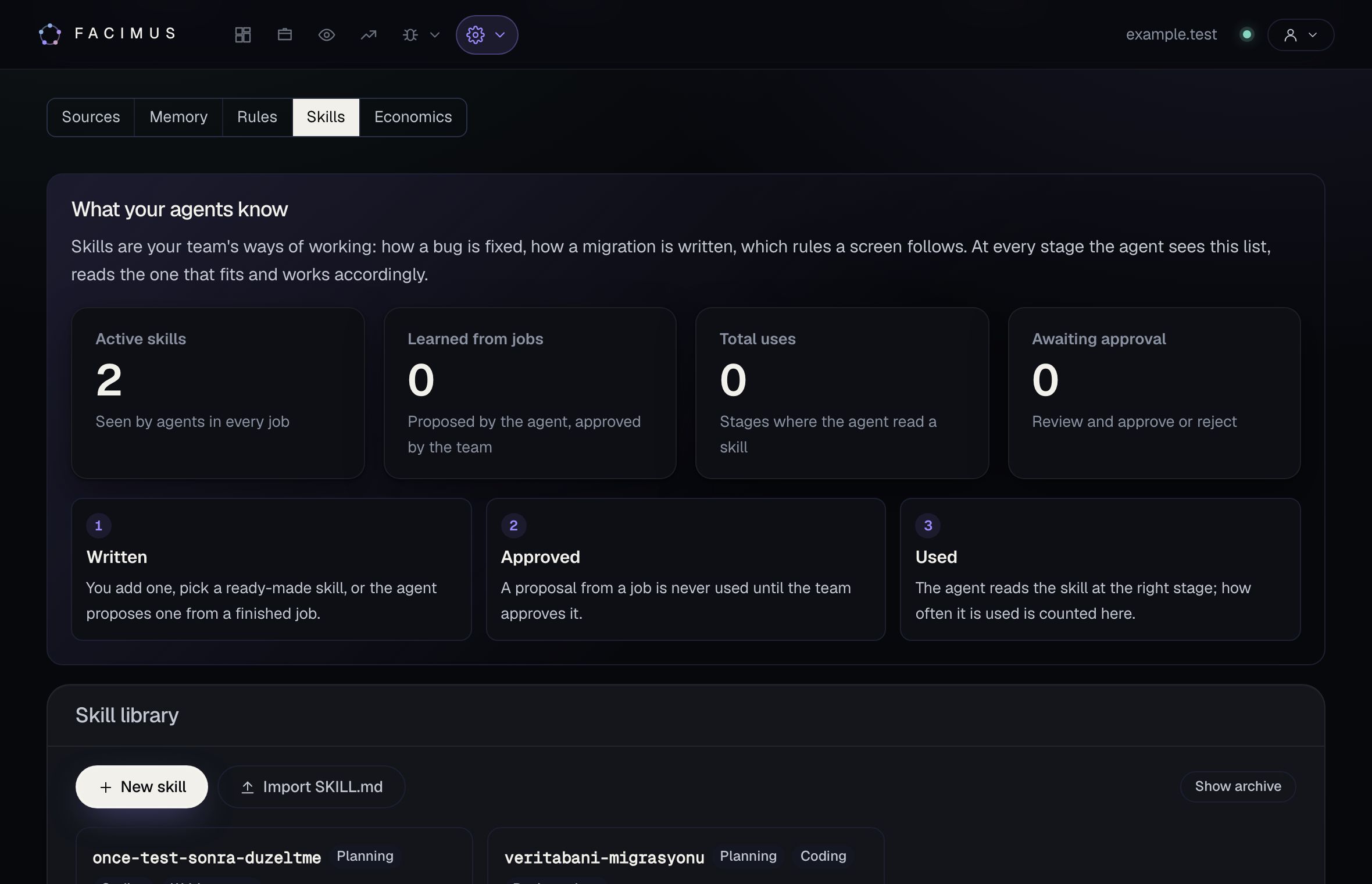
  3. Skills

    Teach your team's methods

    Methods like "reproduce a bug with a test first" or "this is how we write migrations" become skills. When the agent finds a reusable method in a job it proposes one; nothing is used until your team approves it.

    • Compatible with the standard SKILL.md format
    • Ready-made skills to start fast
    • Usage count and version
    Facimus skill library: active skills and the usage flow
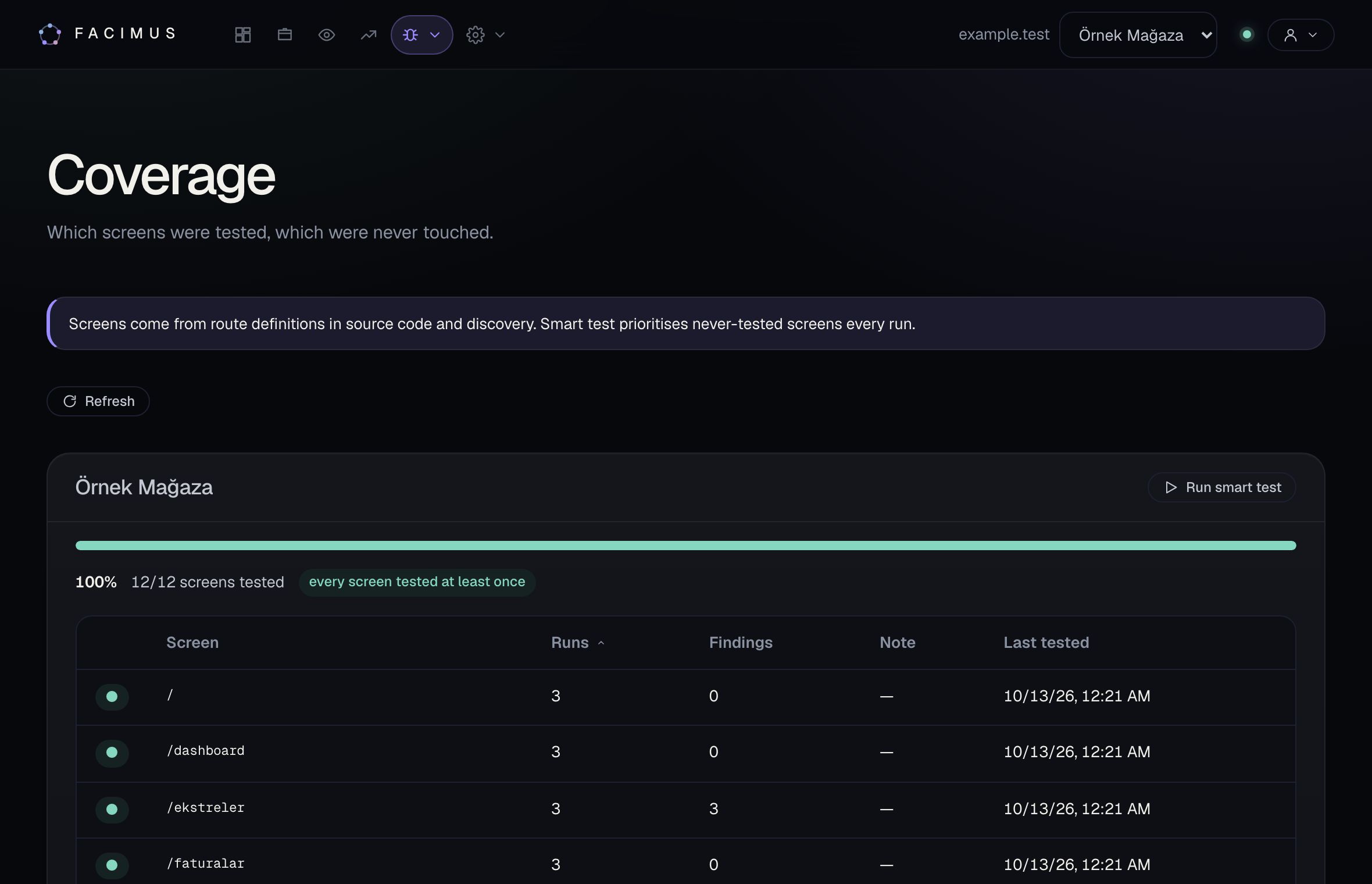
  4. Coverage

    Which screen was never tested?

    The screen list comes from the route definitions in your source code and from exploration. Smart testing gives priority to screens nobody has touched.

    • Runs and findings per screen
    • Screens with scenarios are marked
    • Tested again after merge with a linked test project
    Facimus coverage: tested screens and run counts
  5. Models

    Your model, your account, your region

    Model use goes through smart routing: each stage runs on the model tier that fits the difficulty of the work. In your own runner (on-premise or your own server) you choose which account and which cloud region the model is called from. Assign a model per stage, for example a strong one for planning and a fast one for the commit stage. Connections to Bedrock, Vertex AI and Foundry are supported and verified together per installation.

    • Model per stage
    • Budget with your own price table
    • In your own runner, keys stay with you
    • AWS BedrockYour AWS account
    • Google Vertex AIYour GCP project
    • Microsoft FoundryYour Azure resource
    • Corporate LLM gatewayStandard API compatible
Integrations

Connects to the tools
you already use.

No new tool to move to; Facimus connects to the places your team already works.

  • Code and pull requests

    • GitHub
    • GitLab
    • Bitbucket
    • Other git servers (branch push)
  • Work tracking

    • Jira import and sync
    • Built-in job board
    • Bulk jobs from Excel and CSV
  • Incoming events

    • Sentry
    • GitHub
    • GitLab
    • Linear
    • Signed webhook
  • Notifications and approval

    • Slack (with approval)
    • Microsoft Teams (experimental)
    • Discord (experimental)
    • Google Chat (experimental)
    • Email and weekly digest
    • Webhook
    • ntfy
  • Identity and access

    • Company sign-in (SSO) with OpenID Connect
    • User sync with SCIM
    • Sign in with Google
    • Two-step verification
  • Developers

    • REST API and access keys
    • External agents that submit scenarios and jobs
    • Workspace export
Team

An agent
in every role.

Whatever each person does in a software team, an agent does here. When one finishes, it hands over to the next; comment on the pull request and the revision agent brings back a fix.

  1. PlannerClarifies the request and splits the work into steps.
  2. Code readerMaps the repository's structure and rules.
  3. DeveloperWrites the code on its own branch.
  4. Test writerWrites and runs the unit tests for the change.
  5. ReviewerReviews the change and updates the docs.
  6. GitCommits and pushes; a pull request opens.
  7. RevisionWeighs your pull request comments and fixes them.
  8. Scenario writerDrafts a test scenario for the change.
Trust

Your code stays yours.
So does the decision.

What to know before you open your repository to the agent team.

  • 01

    Cannot push to protected branches

    Every job happens on its own branch and arrives as a pull request. Agents are never given the repository key; the git gate in the runner allows pushes only to the job's branch and refuses pushes to protected branches. For extra assurance, keep branch protection on at your git provider.

  • 02

    Two decisions are yours

    By default, no code is written before you approve the plan; only you can turn on continuing without approval. Merging into your main branch is yours by default. If you choose, Autopilot merges pull requests that pass the tests and review gates; risky work and merges your branch protection does not allow still come to you.

  • 03

    Only the repositories you connect

    Agents take work only in the repositories you add. We recommend scoping the access key to those repositories; you can revoke access at any time.

  • 04

    Isolated runner

    In the cloud, development jobs run in an isolated runner reserved for each workspace, and it shuts down when idle. Workspace data is separated at the database level.

  • 05

    Encrypted keys

    Your access keys are stored encrypted and handed only to the runner doing the job, at the moment it runs.

  • 06

    Every step on record

    The plan, the change, test results, cost and who approved what stay in the job's history.

Deployment

Runs wherever
you want it to.

  • CloudNothing to install; we run the agents.
  • On-premisesThe platform runs in your data center; the AI key and its cost are yours.
  • Your own serverIn your own cloud account, under your own control.
Who it is for

One platform,
many teams.

From product teams to enterprise IT: the same agent team, with your rules.

Product team
Situation
The backlog keeps growing; developers spend most of their time on small fixes and maintenance.
With Facimus
Hand routine cards to the agent; approve the plan and the job arrives as a pull request. The team goes back to the hard problems, and the Value dashboard shows the hours saved.
Software agency and consultancy
Situation
Many client repositories, each with its own rules and tight deadlines.
With Facimus
Each client gets its own workspace with its own rules and skills. Report delivered work and cost to the client.
Enterprise IT
Situation
Security and compliance come first; code and data must not leave the company and access must be managed centrally.
With Facimus
With an on-premise install the whole platform can run in your network and the model in your own cloud account; this setup is supported and verified together against your environment. Company sign-in, user sync, audit log and budget caps are in the product.
Quality team
Situation
Every release brings fear of regressions; nobody knows which screens were tested.
With Facimus
The agent explores the app and collects findings, the coverage map shows the gaps; a finding becomes a fix job and, with a linked test project, is tested again after merge.
Plan

One plan,
transparent credits.

Prices are in USD, monthly. Credits are included; every job spends credits for what it actually consumed, and you see each job's credit breakdown line by line. AI, test environments and automated tests are included; no API keys to manage.

  • To get started

    Basic

    To build and test a product end to end.

    300 $/mo · 300 credits included

    • 2 repositories (e.g. frontend + backend); even if you do not label them, what each repository is and how they connect is detected automatically
    • Plan, code, test, review and pull request: the whole team
    • 1 concurrent job
    • A test environment per job: backend, frontend, database and cache come up and you get a yourname.preview.facimusai.dev address
    • Automated screen tests run once the environment is ready
    • Pay as you go: an environment spends credits only while it is up
    • Smart routing: every step runs on the model tier that fits it
    • Email notifications + Slack, Teams, Discord, Google Chat or webhook
  • Enterprise

    On your own infrastructure, with SSO and user provisioning.

    By quote

    • Repositories and credits by quote
    • On-premises or your own server
    • Single sign-on (SSO) and user provisioning (SCIM)
    • Audit log export
    • Dedicated support
    • Models can also be called from your own cloud account

Add-ons

  • +1 repository20 $/moUp to 4 repositories on Basic.
  • Mobile app50 $/moIf one repository is a mobile app (React Native/Expo): the APK is built, runs in an Android emulator you open in the browser, and its screens are tested automatically.
  • Extra concurrent environmentweb 25 $/mo · mobile 50 $/moThe plan includes 2 test environments (web or mobile) open at the same time; add slots to keep more open at once.
  • Extra credits1 $/creditAdd as many as you need when plan credits run out; jobs continue where they stopped.

What is a credit and how is it set?

1 credit is 1 $. A job spends credits for the resources it really consumed: the text the AI processed (tokens), the time its test environment was up, and automated tests. Each item is converted to credits at a fixed, published rate; no estimates, no flat fees.

  • AI processingTokens read and produced in each stage are measured and converted at that stage's tier rate. Smart routing runs simple steps on a fast, economical tier and hard steps on a deep tier, so the same job spends fewer credits than with one expensive model.
  • Test environmentBackend, frontend, database and cache come up on one temporary server. About 0.03 credits per hour; the environment shuts itself down when the job ends or time runs out, so nothing idles.
  • Automated testsWhen the environment is ready, the selected screens are browsed and checked. The agent that navigates the screens counts as AI processing.
  • You stay in controlYou are warned at 80% of your credits and when they run out. Every job has a safety cap; if a job starts spending more than expected it stops and asks for your approval.
Why did this job spend 10 credits?Example: "Add a status filter to the task list" (frontend + backend)
PlanBalanced tier · 210k tokens0.80
CodeBalanced tier · 1.1M tokens (two repositories)4.60
Write and run testsBalanced tier · 520k tokens2.10
ReviewDeep tier · 140k tokens1.90
Commit and pull requestFast tier · 90k tokens0.10
Test environment1 server · 1 h 40 min0.05
Automated screen test5 screens0.45
=10.00 credits
  • Small fix (copy, style, a bug in one endpoint)2–6 credits
  • New screen + API endpoint8–20 credits
  • Feature spanning several screens20–50 credits

What do 300 credits cover? Building a project of about 10 screens with backend, frontend and database end to end: scanning the repositories, 10 screens, API endpoints, tests and room for revisions. The figures are estimates from measured jobs; every job's real spend is shown in the panel.

Prices exclude VAT. Unused plan credits do not roll over; purchased extra credits are valid for 12 months.

FAQ

Questions
we hear often.

Does the agent merge code on its own?

Not by default. Every job is done on its own branch and arrives as a pull request; merging is your call. If you choose, Autopilot merges pull requests that pass the tests and review; risky work still comes to you. By default no code is written before you approve the plan either.

Where does our code run?

Either in the cloud, in an isolated environment reserved for your workspace, or in a runner inside your own network. With an on-premise install the whole platform runs in your data center.

Which AI models does it use?

Through smart routing: each stage (plan, code, test, review, commit) runs on the model tier that fits the difficulty of the work; simple steps on a fast, economical tier, hard steps on a deep tier. In an enterprise install you can call the model from your own cloud account (AWS Bedrock, Google Vertex AI, Microsoft Foundry or your corporate LLM gateway).

Which repositories does it work with?

On GitHub, GitLab and Bitbucket it opens the pull request itself; on GitHub and Bitbucket it also follows reviews. On other git servers it pushes the branch and you open the pull request.

How do we keep costs under control?

Three layers: when the monthly cap is reached no new job starts; when a job exceeds its budget it pauses between stages and asks for your approval; every stage has its own money, turn and time limit. Cheap stages run on a smaller model by default, and a stage that repeats for the same reason is flagged. The Value dashboard shows cost per job, wasted spend and return.

What does a job cost?

In credits: 1 credit is 1 $. A job spends credits for what it really consumed: AI processing (tokens, by stage tier), the time its test environment was up, and automated tests. Spend varies with the size of the job; a small fix is usually 2–6 credits, a new screen with an API endpoint 8–20. You see every job's credit breakdown line by line in the panel; you are warned at 80% of your credits and when they run out, and extra credits are 1 $ each.

Which languages and stacks can it set up and test?

The runner installs, builds and runs the tests of Java 17 and 21 (Maven, Gradle), Node.js 16-22 (npm, yarn, pnpm), Python 3.12 and 3.13 (uv, pytest), Go and .NET 8/10 projects. Ruby, PHP and Rust are detected but not yet installed or tested.

Can we start from scratch with an empty repository?

Yes. In an empty repository you pick the stack: Spring Boot, Node.js API, React or Angular; a pair in one repository (such as Spring + React) or two separate repositories for backend and frontend. The scaffold is set up, built and tested; if anything fails nothing is pushed. There is no scaffold for Python, Go or .NET yet.

What if we have no time to approve plans?

Before approval the plan is checked in a separate model session against acceptance criteria and team rules; findings appear as a short digest on the approval screen. Autopilot can review plans for you and still hands risky ones back to you. You can also define your own inspector and attach it to the plan, code, test or PR step.

Can one job touch several repositories?

Yes, a job can span up to 5 repositories; each gets its own pull request and the service map adds linked repositories as references. On GitHub, GitLab and Bitbucket the pull request opens automatically; on other git servers the branch is pushed and you open the pull request.

What does it not do yet?

SAML enterprise sign-in (OIDC only), a Kubernetes/Helm install, building and testing iOS apps, video in evidence PRs, evidence for screens behind a login and scaffolds for Python, Go and .NET are on the roadmap, not here yet. On mobile, web apps, Android (Gradle) projects and, with the mobile add-on, React Native/Expo (APK + Android emulator in the browser) are supported. We do not claim what we do not do.

How long does it take to get started?

Right after signing up you can watch the agent team work on a sample project. The first job on your own repository starts once the repository is connected and the runner is ready.

What happens to our data if we leave?

Your code is already in your repository. Jobs, rules, skills, scenarios and findings are exported as a single file; the audit log is downloaded separately as CSV or JSON.

What is agentic team development?

Your next release
starts here.

Early access is by invitation. Tell us briefly about your team and repository; we will send your invitation link when there is a spot. Already invited? Sign in.

For demos, early access and enterprise setup questions